

Looking for a Bobcat drive belt diagram? Before you start, get the correct routing for your specific model. Using the wrong path can cause slipping, poor cutting, or rapid belt wear. This guide focuses on ZT series zero-turn mowers, plus short sections for XM series walk-behinds and CT compact tractors with M-series mower decks. Skip the guesswork and start with the right diagram.
What This Guide Covers
| Equipment Type | Belt Type Involved | Typical Models |
|---|---|---|
| ZT Series Zero-Turn Mowers | Drive Belt + Deck Belt | ZT5000, ZT6000, ZT7000 |
| XM Series Walk-Behind Mowers | Drive Belt + Deck Belt | XM3203, XM4831, XM6150 |
| CT Series Compact Tractors with M-Series Deck | Deck Belt | M60-5 |
This guide is centered on mowing-related equipment. The main focus is the Bobcat drive belt diagram for ZT series zero-turn mowers, while XM and CT sections are kept shorter so the article stays on topic.
Drive Belt vs Deck Belt
Before using any Bobcat drive belt diagram, first confirm which belt you need. A drive belt sends power to help move the machine, while a deck belt sends power to the mower blades. This difference is simple, but it is also where many installation mistakes begin.
Key differences include:
- Drive belt: used for machine travel
- Deck belt: used for blade rotation
- Drive system parts commonly include hydro pulleys, idlers, and tensioners
- Deck system parts commonly include PTO clutch, spindle pulleys, and deck idlers
| Belt Type | Main Job | Common Location | Related Parts |
|---|---|---|---|
| Drive Belt | Transfers power for machine travel | Zero-turn mower drive system | hydro pulleys, idler pulley, belt tensioner |
| Deck Belt | Transfers power to mower blades | Mower deck | spindle pulleys, PTO clutch, deck idler pulley |
ZT Series Zero-Turn Mowers
ZT series is the core of this topic because these mowers commonly use two separate belt systems. One is the drive belt, and the other is the deck belt. When someone searches for a drive belt diagram, this is usually the section they actually need.
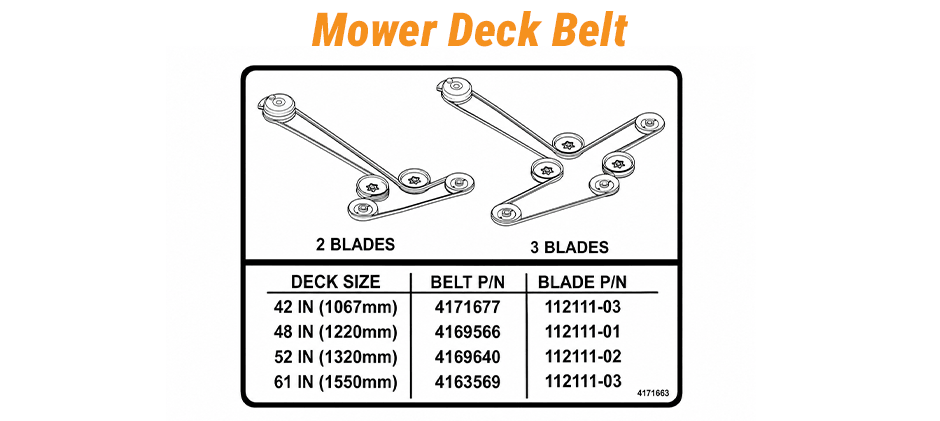
A clear ZT routing diagram should show the full belt path and the main points that affect installation. These usually include:
- Idler pulley locations
- Tension arm position
- PTO clutch location
- Spindle pulley order
- Belt keepers and guards
For the drive belt, the diagram should help identify the route through the engine output area, hydro drive pulleys, idlers, and tensioner. If this belt is worn, common signs include:
- Weak travel response
- Slipping under load
- Squeal at startup
- Visible glazing on the belt
For the ZT series deck belt, the routing should show how power moves from the PTO area to the spindle pulleys through the deck idlers. If the deck belt is failing, you may notice:
- Poor cut quality
- Weak blade speed
- Squeal when PTO engages
- Frayed edges
- Heat around the belt cover
When using the diagram on a ZT5000, ZT6000, or ZT7000, it is best to compare the routing before removing the old belt. A simple service approach is:
- Confirm the model and serial number
- Identify whether the belt is for drive or deck use
- Take a photo of the current routing
- Inspect pulleys and idlers before installing the replacement
- Make sure the new belt sits fully in each pulley groove
Many repeat failures are not caused by the belt alone. In many cases, the actual problem is one of the following:
- Worn idler pulley bearings
- Weak belt tensioner spring force
- Pulley groove wear
- Belt misalignment
XM Series Walk-Behind Mowers
XM walk-behind mowers also use drive and deck belts in many configurations, but their layouts are different from ZT mowers. This section stays brief because its main purpose is to prevent readers from confusing XM routing with a drive belt diagram meant for the ZT family.
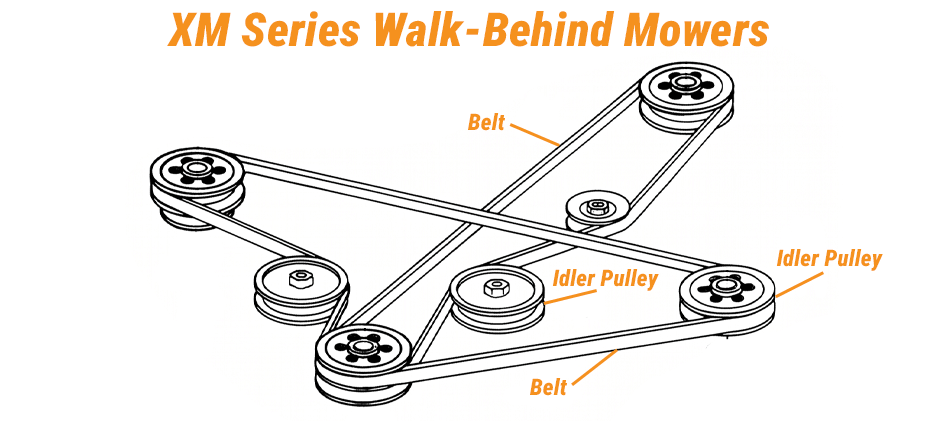
Common XM models include:
- XM3203
- XM4831
- XM6150
Before ordering or installing a belt, always confirm:
- Model
- Serial number
- Deck width
- Whether the belt is for drive or deck use
CT Series Compact Tractors with M-Series Mower Decks
CT compact tractors with M-series mower decks use a separate attachment-style layout. Here, the focus is on the deck belt, especially for the M60-5 mower deck. This is different from a ZT mower, so it should not be grouped into the same routing logic as a general drive belt diagram for zero-turn models.
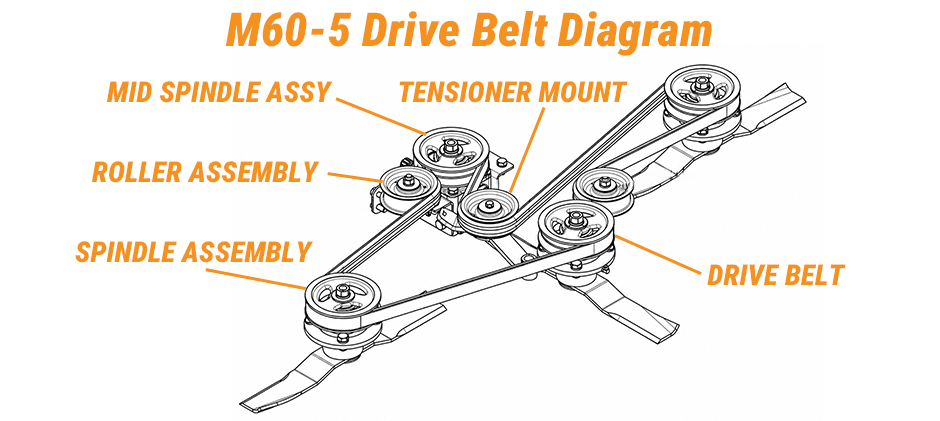
A useful diagram should clearly show:
- Deck belt
- Center spindle pulley
- Left spindle pulley
- Right spindle pulley
- Idler pulley
- Tension spring
If the belt is routed incorrectly, common results include:
- Squeal
- Weak cutting
- Uneven blade speed
- Rapid belt edge wear
Common Belt Problems and Checkpoints
A routing chart helps with installation, but it does not explain why the old belt failed. Before fitting a new belt, inspect the surrounding parts carefully. The most common problem areas are:
- Idler pulley bearings
- Belt tensioner movement
- Pulley groove condition
- Belt alignment
- Spindle or driven-part resistance
| Check Point | What To Look For |
|---|---|
| Idler pulley | rough spin, side play, noise |
| Belt tensioner | weak spring force, unstable movement |
| Main pulleys | groove wear, wobble, cracks |
| Belt condition | glazing, cracking, frayed edges |
| Driven parts or spindles | drag, heat buildup, abnormal resistance |
Even the correct Bobcat drive belt diagram will not solve repeat failures if these related parts are worn or damaged.
Basic Belt Replacement Workflow:
A Bobcat drive belt diagram is most useful when paired with a clear replacement process. Before starting, park the machine on level ground, shut off the engine, remove the key, and open the necessary guard or cover.
Then follow these steps:
- Take a photo of the old belt path
- Release the tensioner carefully
- Remove the old belt
- Inspect pulleys, idlers, and tension arms
- Install the new belt using the correct routing
- Check that the belt is fully seated in every pulley groove
- Restore tension
- Run a short test and confirm alignment
Final Thoughts
Always match the diagram to your exact machine model and serial number. Different models can use different belt paths. When you need a replacement, check FridayParts, an aftermarket parts supplier offering high-quality products at affordable prices. With a vast inventory and wide compatibility across many heavy equipment brands, FridayParts makes it easy to find the right belt for your Bobcat.
