

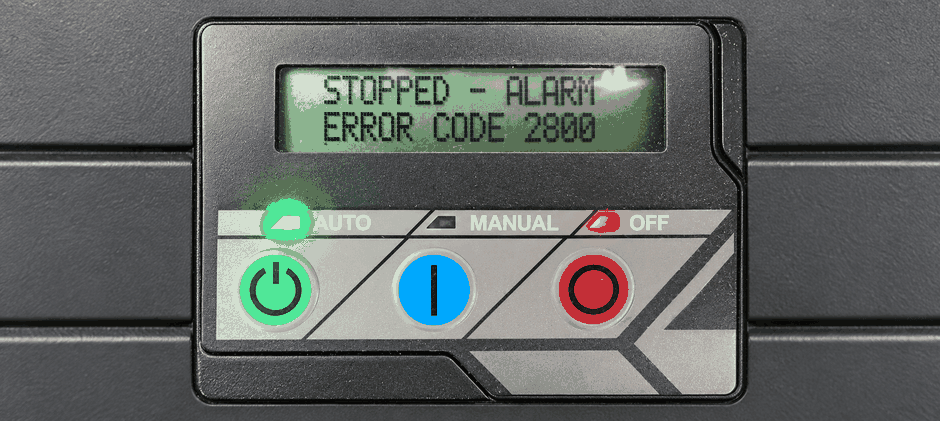
When your Generac home standby generator displays Generac error code 2800, it just means the auxiliary shutdown switch got flipped to the off position. That’s why the engine won’t run. This is a built‑in safety feature for Generac units, meant to keep the system and service technicians safe. The good news is you can reset this Generac alarm by yourself in just a couple of minutes; no need to call a tech out.
What Does Generac Error Code 2800 Mean?
If you look at your Generac Evolution control panel and see a flashing red LED light alongside the message “STOPPED – ALARM” or “SHUTDOWN SWITCH (2800),” your generator has registered an emergency stop. The Generac error code 2800 is a direct alert that the auxiliary shutdown switch is currently in the open, or “O”, position. If you use the Generac Mobile Link app, you will also receive a push notification on your smartphone alerting you that the generator is disabled.
Since 2017, fire safety regulations have required these specific exterior switches on all Generac air-cooled home standby units. They provide fire department personnel and Generac service technicians a fast, accessible way to cut power during an emergency. When the switch is toggled off, the Generac controller completely disables the engine. This keeps the unit from starting automatically during a grid power outage or during its scheduled weekly exercise run.
“The auxiliary shutdown switch is a mandatory safety mechanism on modern Generac generators. When you set the switch to the off position, the controller blocks all automatic and manual start attempts until you manually reset the switch and clear the alarm from the panel.”
Why Is My Generac Showing Error Code 2800?
You may wonder how someone switched this switch off when nothing unexpected happened at your house. With Generac generators, it’s almost always just an accident. Generac mounts these switches on the outside of the weatherproof cabinet so users can access them quickly, but this also makes them easy to bump.
- Lots of times homeowners are out doing yard work, spreading mulch, or running a weed trimmer near the generator. They brush up against the switch and never even notice they flipped it.
- Animals like squirrels or raccoons climbing on the warm generator housing can also knock that rubber toggle switch down without much effort.
- Another scenario: Your Generac service tech might have manually turned the switch off while waiting for new repair parts to come in. That keeps the generator safely shut down until the fix is finished.
Where Is the Generac Auxiliary Shutdown Switch?
To fix the issue, we first need to locate the switches on your specific Generac model. Depending on the engine size of your Generac Guardian or Next Generation unit, you will have either one or two of these small, black, rubber-coated toggle switches.
- For most standard Generac air-cooled models manufactured after 2017, you will find the primary external switch on the back exterior panel of the generator enclosure. It is usually located near the top corner. The switch flips vertically. The manufacturer marks the top of the switch with an “I” for the closed or ON position and the bottom with an “O” for the open or OFF position.
- If you have a larger Generac unit with a two-cylinder engine (typically 15 kW models and higher), your generator has a second switch. This internal switch is located inside the main housing. You will need to lift the top lid of your Generac and look at the firewall panel near the main control board. Both of these switches must be in the “I” position for the Generac engine to run.
- For owners of 50 Hz Generac models, the setup looks a bit different. Instead of a toggle switch on the back, you will find a red emergency stop button (E-stop) on the side of the unit near the LED indicator lights.
How to Fix and Reset Generac Error Code 2800?
Clearing this alarm on your Generac requires no special tools. We just need to make sure the physical switches are in the correct position and then tell the Generac controller to reset. Follow these exact steps to get your home’s backup power restored.
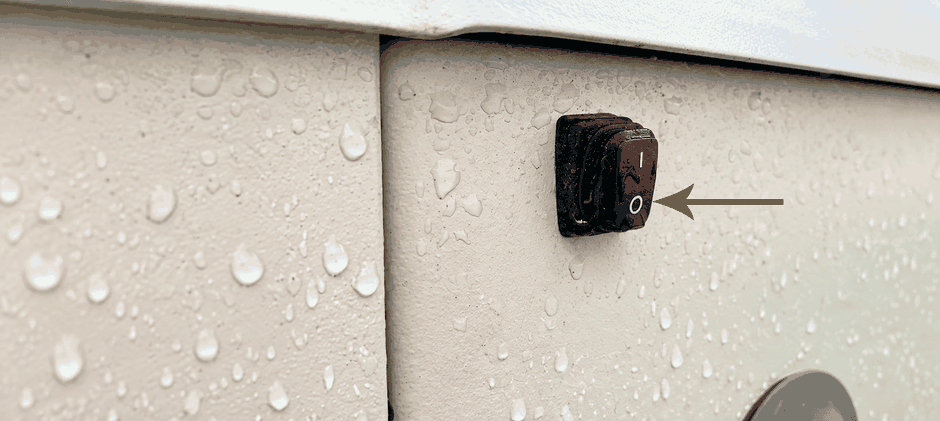
First, walk to the back of your Generac unit and locate the external toggle switch. Press the top half of the switch down so that the “I” is pushed in. This closes the circuit. If you push the switch down on the “O” side, it remains open, and the Generac alarm stays active.
Second, if your Generac has a two-cylinder engine, open the top lid. Find the second switch on the internal firewall panel. Press the top half of this switch down until the “I” is pressed in. Make sure you set both switches correctly. If you have a 50 Hz Generac model, pull the red E-stop button outward to disengage it.
Third, we need to clear the Generac computer’s memory. Go to the main control panel screen under the lid. For standard Guardian models, press the red OFF button once. Next, press the ENTER button. This action wipes the Generac error code 2800 from the screen. Finally, press the green AUTO button. The screen should now show that the system is ready, and the red flashing light will disappear.
If you own a newer Generac Next Generation model, the panel reset is slightly different. After making sure the physical switches are in the “I” position, go to the control screen and press and hold the red OFF button for three full seconds. Once the screen clears, press the green AUTO button to return your Generac to automatic standby mode.
Why Does Generac Error Code 2800 Keep Coming Back?
Sometimes, you might go through all the reset steps, but the Generac error code 2800 pops right back up on the Evolution controller screen. Or, you might clear it successfully, only to have the alarm return a few days later when nobody has been near the generator.
If the alarm still won’t clear after you firmly toggle all switches to their “I” ON position, your Generac probably has a wiring or faulty‑component problem. Vibration from regular engine operation can loosen the wires running from the back of these switches to the main control board over time. Moisture and corrosion may also damage the metal contacts inside the rubber boot. Even when you physically flip the switch to ON, this corrosion can break the electrical circuit and leave the alarm active.
If you see visible wiring damage or the code remains after replacing the switch, we recommend calling an authorized Generac service dealer. They can test the wire continuity and make sure your home standby system is ready for the next outage.
Summary
Dealing with a Generac error code 2800 on your home standby generator is usually a very simple task that takes less than five minutes to resolve. By locating the external and internal auxiliary switches on your Generac unit, flipping them to the closed “I” position, and resetting the Evolution control board, you can quickly restore your home’s backup power system. Rely on FridayParts quality aftermarket generator replacement parts if the switch mechanism fails over time.
