

A Genie serial number lookup starts on the chassis, not at the controls. On many GS scissor lifts, the serial label and the stamped frame number help you confirm the model, narrow the year, and match the right manual and parts. That matters when you are ordering a battery charger, checking a control box, or looking at a used machine. Read on, and you can sort out old and new serial formats, year clues, and the checks that help you avoid costly mistakes.
Where To Find The Serial Number?
On most GS slab scissor lifts, the serial number is tied to the chassis. You should look for both a printed label and a stamped number in the steel. Do not stop after finding only one.
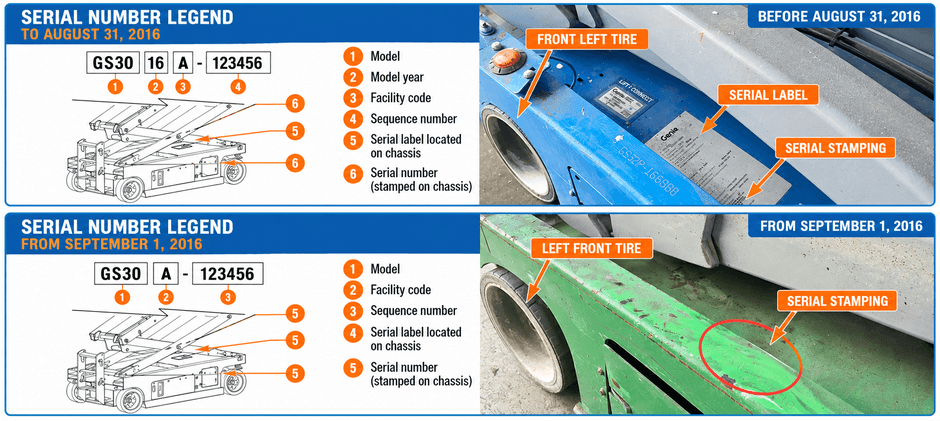
Common Locations To Check First
Start at the left side of the machine and work around the lower chassis. The most common spots include:
- Front left chassis rail near the wheel
- Frame area below the scissor stack
- Side chassis panel near the battery compartment
- Main machine ID plate area
If the platform is fully lowered, part of the label may be harder to see. Dirt, paint, and grease can hide both the plate and the stamping, so clean the area first.
Here is a quick guide:
| ID Type | Where To Look | Why It Matters |
|---|---|---|
| Serial label | Chassis plate area | Shows full machine ID details |
| Stamped serial | Frame steel on chassis | Gives a more permanent ID |
| Model decal | Exterior machine panel | Helpful for model only, not enough for parts |
A stamped number matters because labels can get painted over, scratched, or lost. If you are checking a used lift, compare both marks before buying electrical parts or hydraulic parts.
What To Do If The Tag Is Hard To Read?
Use a safe and simple approach:
- Clean with a soft cloth
- Use mild cleaner only
- Try a flashlight from an angle
- Check the stamped frame serial if the label is unclear
Avoid heavy scraping or grinding. The goal is to reveal the characters, not damage them.
How To Read A Genie GS Serial Number?
A Genie serial number lookup gets easier once you know what the sections mean. On GS scissor lifts, the serial format changed after August 31, 2016. That matters because the older format can show the model year directly, while the newer format may not.
Older Format Used Before September 1, 2016
Many GS machines built on or before August 31, 2016 use an older serial format like this:
GS3005A-12345
This layout usually breaks down like this:
| Section | Meaning |
|---|---|
| GS30 | Model family |
| 05 | Model year |
| A | Facility code |
| 12345 | Sequence number |
In this format, the two digits after the model family show the model year. For example, 05 points to 2005, and 16 can point to 2016. But this rule only applies to machines that use the older serial structure.
Newer Format Used From September 1, 2016
Machines built from September 1, 2016 onward use a different serial structure. In that format, the year is not shown as a separate two-digit section after the model family.
That means you should not assume every GS serial number lets you read the year in the same way. A newer serial may still identify the machine family and sequence number, but the year may need to be confirmed through the machine label or serial-based records.
This is why a Genie serial number lookup should not rely on decals alone. It is also why many buyers check the serial before ordering a harness, lift switch, or platform control box.
Can You Tell The Year From The Serial Number?
Sometimes yes, sometimes no. It depends on which serial format your GS lift uses.
When Can The Year Be Read Directly?
If the machine uses the older format from before September 1, 2016, the two-digit section after the model family usually shows the model year. For example:
- 15 usually points to 2015
- 16 can point to 2016 in the older format
That gives you a quick year clue during a Genie serial number lookup. It is useful for parts checks and for sorting used inventory. Still, this only works if the machine actually uses the older serial structure.
When Does the Year Need Another Check?
If the machine uses the newer format, the year is usually not visible in the serial itself. In that case, check:
- The machine data label
- The service or parts manual by serial range
- Dealer or supplier records tied to the serial
- Fleet maintenance records if available
Here is the quick rule:
| Serial Style | Year Visible In Serial | What To Do |
|---|---|---|
| GS3005A-12345 | Yes | Use the two-digit year section in the older format |
| Newer post-2016 format | No | Check label- or serial-based records |
Keep one more point in mind. Model year and build date are not always the same. If you need exact build timing for manuals or parts, use the machine label and serial-based documentation together.
How Do You Use The Serial Number?
Once you have the full number, the next step is to use it where it matters most. A Genie serial number lookup should guide your manual choice, your parts search, and your inspection of any used machine. That helps you avoid ordering the wrong part or buying a lift with an unclear machine identity.
Steps Before Buying Parts
Before ordering anything, work in this order:
- Write down the exact model
- Record the full serial number
- Photograph the label and frame stamp
- Match the correct manual by serial range
- Confirm the part against that range
This matters most on systems that changed during production. A lift may look the same from the outside but still use different internal parts. That often happens in controls, charging systems, and electrical layouts.
Parts that deserve extra care include:
- battery chargers
- joystick controllers
- control boxes
- wiring harnesses
- limit switches
- hydraulic valve coils
- drive motors
- seal kits
Which Parts Change By Serial Range?
Some parts categories are more likely to vary across serial ranges than others. Use the serial first, then confirm the part.
| Parts Category | Why Serial Range Matters |
|---|---|
| Controls | Button layout, board type, and connector style may differ |
| Electrical | Harness routing and plug style may change |
| Charging system | Charger output and connections may vary |
| Hydraulics | Valve coils and seal kits may not match across runs |
| Drive system | Brake or motor details may change by build period |
If you are replacing a charger assembly or checking a hydraulic valve, the serial range often matters more than the decal on the side panel.
Check A Used Machine Before You Commit
A used GS lift can look fine and still create parts and service problems later if the machine ID is unclear. Before you commit money, compare the serial in more than one place:
- Serial label on the chassis
- Stamped serial on the frame
- Sales paperwork
- Past service records
- Fleet ID records if available
If one does not match the others, stop and sort that out first.
You should also look closely at the ID area for signs that need more review:
- Fresh paint over the serial zone
- Missing or damaged tag
- Weld repair near the stamped section
- Paperwork that lists only the model
- Parts history that does not fit the current machine
Panel swaps and control swaps can happen over time. A machine marked GS-1932 may have had later repairs that changed some installed parts. That is why a Genie serial number lookup should include both the serial label and the stamped frame number.
Once the machine ID is confirmed, keep a clean record:
- Store clear photos on your phone
- Add model and serial to the shop file
- Put the full number in maintenance logs
- Note any serial-based part changes
That makes future service much faster when you need a platform controller, battery charger, or drive component.
Final Words
A good Genie serial number lookup helps you identify the machine, narrow the year, and order the correct parts with less risk. Check the chassis label, confirm the stamped frame number, and use both before buying anything important. When you need aftermarket parts, we recommend FridayParts for high-quality products at affordable prices, a vast inventory, and wide compatibility across many heavy equipment brands.
