

Megawatt Charging (MCS) is a way to charge the huge batteries in your heavy equipment—fast. It’s a game-changer for planning your workday, keeping safe, and maximizing uptime.
If you’re looking into MCS, you probably want to know what it is, if it’s right for your fleet (in mining, construction, or at a port), and what to check before you buy anything. This guide explains it all in simple terms and gives you checklists you can use in the field.
What Is Megawatt Charging?
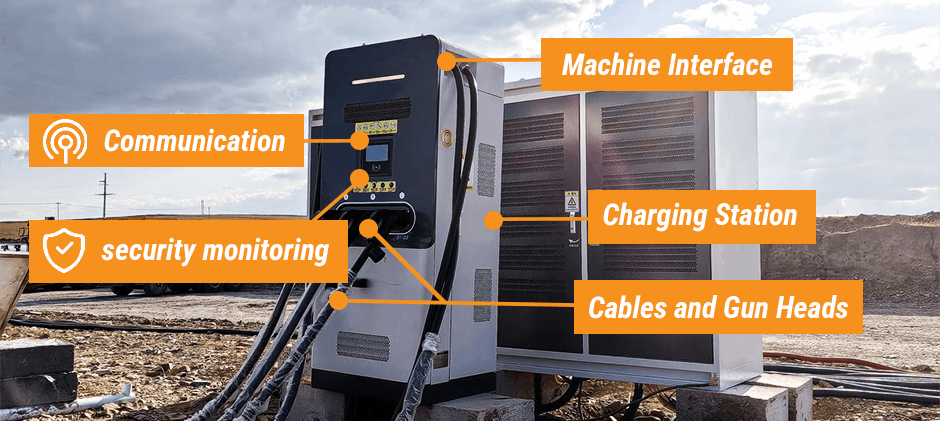
Think of MCS as a complete power-up kit for your biggest machines. It’s more than just a plug. It’s a system that includes:
- The special plug on your machine.
- A thick (often liquid-cooled) cable and handle.
- The main charging station (the “box”).
- Smart computers that let the charger and machine talk to each other.
- Multiple safety monitors to prevent problems.
Bottom Line: You don’t get MCS just by changing a plug. It’s a full system upgrade.
Why Care About Megawatt Charging?
Because with big electric machines, charging time is your new enemy. If your excavator needs 8 hours to charge but you only have a 1-hour break, you have a problem.
MCS is for when you need to get back to work fast. Your charging station becomes as important as your machine for keeping the job going.
Key Idea: Downtime is no longer just in the workshop; it can happen at the charging station.
Do You Really Need It?
The right charger is the one that fits your work schedule.
You Probably Need Megawatt Charging If
- You have short, fixed breaks (like a 30-minute lunch) and need to add a lot of power.
- Your machines run in multiple shifts with little downtime.
You Might Not Need Megawatt Charging If
- Your machines can charge slowly overnight.
- You have long, planned breaks where a slower DC charger can do the job.
How Much Power Are We Talking About?
“Megawatt” means “a million watts.” It’s a huge amount of power, created by combining high voltage (Volts) and high current (Amps). The official MCS standard can handle up to 3.75 Megawatts.
To handle that much energy, the cables and plugs get very hot. That’s why they often need a liquid cooling system running through them to prevent damage.
Look for “Standard,” Not “Custom.”
You don’t need to memorize code numbers. Just know this: Official standards (like IEC and ISO) mean that parts from different companies should work together.
If a seller can’t name the standards their gear follows, be careful. You might be buying a “custom” system that’s expensive to fix and won’t work with anything else.
How Is It Different From a Car Charger (CCS)?
If CCS is a fast charger for a car, MCS is a supercharger for a giant mining truck. It’s built for much more power, all day long. This means:
- Bigger, tougher cables that are often liquid-cooled.
- Heavier plugs are designed for thousands of uses in rough conditions.
- Smarter planning for where you park and how operators handle the heavy cable.
Plan Your Charging Spot Like a Pro
Your charging station is now part of the job site. It needs to be tough. Before you install anything, think about these 6 things:
- Seals: How will you keep dust, mud, and water out of the plugs?
- Cable Handling: How will you hang or reel the heavy cable so it’s not on the ground?
- Crash Protection: What will stop a machine from backing into the charger? (Think concrete posts or guard rails).
- Keeping it Clean: How will you make it easy to clean mud and dirt off the plugs?
- Easy for Drivers: Is the parking spot clearly marked so drivers can line up perfectly every time?
- Room to Fix It: Is there enough space for a mechanic to inspect and replace parts?
R-MCS For Really Tough Jobs
If your site is all mud, rocks, and dust (like a mine or quarry), you need the “rugged” version: R-MCS.
R-MCS is built to be tougher, better sealed, and easier to fix in the field with basic tools. If you work in a harsh environment, ask vendors about a ruggedized option from day one.
Safety and Security First
- Safety: This much power is dangerous. The system has many automatic safety checks (like locking the plug before power flows) to protect operators. Never bypass them.
- Security: A secure system prevents unauthorized use and protects your charging data from tampering. This is especially important for “Plug & Charge” systems that handle billing automatically.
Quick Troubleshooting Guide
Most charging problems have a simple cause. Check these first.
- Won’t start: Plug isn’t in all the way or locked. Or, the plug is dirty.
- Starts, then stops: The system is overheating (cooling fault), or the plug is loose.
- Charges slowly: The charger is limiting power because it’s too hot outside, its cooling is failing, or the site doesn’t have enough power.
- “Communication Error”: A problem with the computer chips or damaged pins in the plug.
- Plug feels very hot: The internal cooling is failing, or the contacts are worn out.
- Hard to plug in: The machine is parked at the wrong angle, or there’s dirt/damage on the plug.
- Fails in rain or dust: The seals are bad and need to be replaced.
- The same machine always fails: The problem is likely with the machine’s plug, not the charger.
Key Idea: With megawatts, a little bit of dirt or heat can cause a big failure.
7 Checks to Prevent Downtime
Do these checks regularly, not just after something breaks.
- Check the plug and seals for cuts, dirt, or damage.
- Check the lock to make sure it clicks firmly in place.
- Check for leaks in the liquid-cooling lines.
- Check the cable for scrapes or wear, especially at bend points.
- Clean the plug with approved methods.
- Review error logs to spot repeating problems.
- Check the crash guards to make sure they are still solid.
Key Idea: Inspect a little, replace a little. Ignore it, replace everything.
What to Ask a Vendor
A good vendor will give you clear answers about limits.
- “At what temperature does the charger start to reduce power?”
- “What official standards (IEC, ISO) does this system follow?”
- “What is your plan for field service and spare parts?”
- “Show me the maintenance schedule and what your warranty covers.”
Remember: A promise on a “roadmap” is not the same as a feature that is “supported today.”
Summary
Getting megawatt charging right means treating your charging station like a piece of heavy equipment. It needs smart planning for cable handling, cooling, and protection from the job site environment. By focusing on a tough and easy-to-maintain setup, you’ll get reliable power and avoid costly downtime. For all the essential parts that support your electrified fleet—from the seals and bearings that protect components, to the filters for cooling systems, and the switches and sensors that keep everything running safely—FridayParts provides the durable components you need to maximize uptime. Build a charging setup that’s built to last.
